
Phishing remains one of the most common and dangerous cyber threats facing organizations today. According to industry reports, over 80% of security breaches involve phishing in some form. The good news? Employees who know what to look for can stop these attacks before they succeed.
This guide provides a clear phishing red flag checklist that every employee can use when reviewing emails, messages, or links. Share it across your team to strengthen your company’s first line of defense: its people.
Why Phishing Awareness Matters
Phishing attacks don’t just target IT teams. Every employee is a potential entry point for cybercriminals. All it takes is one click on a malicious link or one download of a fake attachment to expose sensitive company data.
By learning the warning signs of phishing, employees can reduce risks dramatically. Think of this checklist as your personal defense system for spotting cyber scams before they spread.
The Phishing Red Flags Checklist
Before clicking, replying, or downloading anything, run through this checklist. If you notice even one of these signs, stop and verify before taking action.
1. Suspicious Sender Details
- Email address doesn’t match the display name.
- Domain looks “off” (e.g.,
@micros0ft.cominstead of@microsoft.com). - Unexpected messages from executives, HR, or IT.
2. Generic or Unusual Greetings
- Starts with “Dear Customer” or “Dear User” instead of your name.
- Unfamiliar nicknames or incorrect spellings of your name.
3. Urgent or Threatening Language
- “Your account will be locked in 24 hours.”
- “Immediate action required.”
- Messages designed to create panic or fear.
4. Unexpected Attachments or Links
- Attachments you weren’t expecting, especially
.exe,.zip, or.scrfiles. - Links that look shortened (e.g.,
bit.ly/...) or don’t match the sender’s supposed company. - Hovering over the link shows a mismatched or suspicious URL.
5. Poor Grammar and Spelling
- Awkward phrasing or broken English.
- Random capitalization, punctuation, or typos.
- Doesn’t read like professional communication.
6. Requests for Sensitive Information
- Asking for login credentials, payroll details, or banking info.
- Requests to bypass normal company processes.
- Urging you to send confidential data via email.
7. Unusual Timing or Context
- Emails sent at odd hours (like 3 AM) from local colleagues.
- Messages unrelated to your job role or current projects.
8. Fake Branding or Design Flaws
- Logos look blurry, stretched, or outdated.
- Colors or fonts don’t match the company’s usual style.
- Email templates that feel “off” or inconsistent.
What To Do If You Spot Red Flags
Spotting a phishing attempt is only half the battle—how you respond matters. Here’s what to do:
- Don’t click anything. Avoid links, buttons, or attachments.
- Verify the sender. Contact them through official channels (not by replying).
- Report immediately. Use your company’s reporting system or forward to IT/security.
- Delete the message. Once reported, remove it from your inbox.
Training Employees to Recognize Phishing
Organizations can reduce phishing risk significantly by building a culture of awareness. This can be achieved by using tools like ATTACK Simulator to run regular phishing simulations that test employee responses, delivering short and engaging security awareness training modules through the same platform, providing easy reporting channels such as a “Report Phishing” button in email, and offering positive reinforcement when employees identify and report suspicious messages.
Beyond Email: Other Phishing Tactics
While email remains the most common phishing channel, cybercriminals are constantly adapting. Employees need to stay alert across multiple platforms and communication methods. Phishing can happen in texts, phone calls, social media, and even collaboration tools like Slack or Teams.
SMS Phishing (Smishing)
Smishing uses **text messages** to trick recipients into clicking malicious links or sharing sensitive information. A common example is a fake delivery notice:
Since text messages feel more personal, people are often caught off guard. Always check the sender number, and when in doubt, go directly to the company’s official website or app instead of tapping on links.

Voice Phishing (Vishing)
In vishing attacks, fraudsters call employees pretending to be from trusted organizations—like banks, tech support, or even internal departments. They often rely on authority and urgency to pressure victims into giving away login credentials or payment details.
“This is IT support. Your account has been compromised. Please read me your login code so I can secure it right now.”
Typical vishing script
If you receive a suspicious call, hang up and call back using an official number. Legitimate companies and internal teams will never object to being verified.
Social Media Phishing
Attackers are also active on LinkedIn, Facebook, and even Instagram. Fake recruiter profiles, malicious job offers, or too-good-to-be-true promotions can all be part of a phishing attempt.
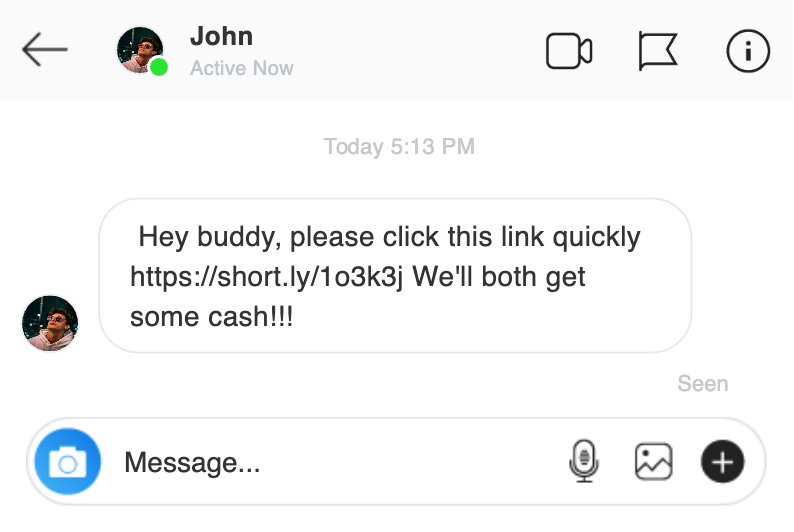
Cybercriminals exploit the trust factor of social networks. If a “colleague” or “friend” sends you a link, you’re more likely to click. That’s why verifying accounts and being cautious with connections is essential.
Collaboration Tools
With the rise of remote and hybrid work, phishing has moved into collaboration platforms such as Microsoft Teams, Slack, and Zoom. Attackers might send fake meeting invites, malicious file links, or impersonate managers.
“Click here to join the mandatory HR meeting.”
Phishing attempt disguised as a meeting invite
Employees should treat suspicious messages in these platforms with the same caution as email, especially when they involve requests for credentials or financial transactions.
Key Takeaway
Phishing is no longer confined to your inbox. By staying alert across texts, calls, social media, and collaboration tools, employees can block attackers at every entry point. Remember: if something feels unusual, it probably is.
Frequently Asked Questions About Phishing
What are the most common signs of a phishing email?
The most common signs include suspicious sender addresses, urgent or threatening language, unexpected attachments or links, poor grammar, and requests for sensitive information. If any of these appear in an email, it should be treated with caution.
How can employees protect themselves from phishing attacks?
Employees can protect themselves by pausing before clicking, checking sender details, hovering over links to verify URLs, and reporting suspicious messages to their IT or security team. Regular training and awareness also play a key role.
What should I do if I accidentally click a phishing link?
If you click a phishing link, disconnect from the internet immediately, inform your IT/security team, and change your passwords. IT may also advise running a malware scan or resetting your device depending on the situation.
Are phishing attacks only sent through email?
No. While email is the most common method, phishing also occurs through text messages (smishing), phone calls (vishing), social media platforms, and even collaboration tools like Microsoft Teams or Slack.
Why is phishing awareness training important for companies?
Phishing awareness training is important because employees are the first line of defense. Training helps staff recognize red flags, avoid falling for scams, and report incidents quickly—reducing the risk of a costly data breach.